Marble Patterns: Seamless, High-Resolution Textures for Real-World Design Projects
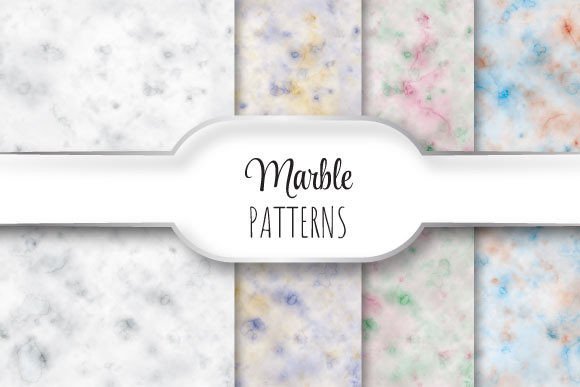
Marble Patterns are not just decorative flourishes—they’re precision-crafted, photorealistic digital textures designed to bring authenticity, depth, and consistency to professional design work. Each pattern in this collection is a 12 × 12 inch (3600 × 3600 pixel), 300 dpi JPEG—optimized for print and high-fidelity digital use. The zip file contains four distinct, seamlessly repeating marble textures, meaning they tile infinitely without visible edges or breaks—ideal for backgrounds, surfaces, packaging, web interfaces, and physical product mockups.
Why Seamless Repeating Patterns Matter in Practice
Designers, architects, marketers, and craft professionals often face a common challenge: scaling natural materials like marble across large or irregular surfaces without distortion, repetition fatigue, or visible seams. A non-seamless texture may look convincing at small scale—but when tiled across a website hero section, a trade show backdrop, or a custom wallpaper layout, mismatched edges break immersion and undermine professionalism.
Marble Patterns solve this by using advanced image synthesis techniques to ensure perfect edge alignment. Each tile transitions smoothly from right to left, top to bottom—so whether you’re applying it to a 48-inch wide brochure spread or a full-screen web background, the result feels organic, not engineered.
Real Needs, Real Solutions
Consider these everyday scenarios where Marble Patterns deliver tangible value:
- Print designers preparing luxury packaging or stationery need crisp, scalable textures that hold detail at 300 dpi—without bloated file sizes or interpolation artifacts. These JPEGs strike that balance: resolution-rich yet lightweight enough for efficient workflow integration.
- Web and UI designers building premium brand experiences often seek tactile, high-end visual cues. A subtle marble background on a product page or dashboard adds sophistication without sacrificing load time—especially since each file is optimized for clarity and compression efficiency.
- Architectural visualizers and 3D artists use seamless textures as base maps for materials in rendering software (e.g., Blender, SketchUp, or Adobe Dimension). The 12 × 12 inch dimension aligns with standard UV mapping conventions, reducing stretching or tiling adjustments during import.
- Small-batch makers and craft entrepreneurs creating marble-look resin trays, ceramic tiles, or fabric prints rely on accurate reference patterns. These files provide consistent color tonality, veining density, and grain direction—helping bridge the gap between digital concept and physical prototype.
How to Use Marble Patterns Effectively
Start by matching the pattern’s character to your project’s intent. One file might feature bold, dramatic veining suited for editorial headers or statement furniture renders; another may offer soft, cloud-like calcite swirls ideal for spa branding or minimalist interiors. Don’t default to “most realistic”—choose the one that supports your message and mood.
When applying digitally, avoid excessive scaling. Since each file is already 3600 × 3600 pixels at 300 dpi, enlarging beyond 100% in raster editors risks softening fine details. For vector-based layouts (e.g., in Adobe Illustrator), embed the JPEG at native size or use it as a linked swatch for consistent reuse.
For print production, confirm your printer’s color profile requirements. These Marble Patterns are delivered in sRGB—standard for screen use—but if outputting to coated or uncoated offset stock, consult your print vendor about converting to CMYK *after* final layout approval, not before. That preserves fidelity during design iteration.
Tailoring Use Across Experience Levels
Beginners benefit most from starting simple: apply one Marble Pattern as a full-bleed background in a presentation slide or social media post. Observe how lightness, contrast, and vein complexity affect readability—especially when overlaying text. Try adjusting blend modes (e.g., Multiply or Overlay in Photoshop) to integrate the texture with underlying colors without losing its natural character.
Intermediate users can combine Marble Patterns with procedural tools. In Figma or Sketch, use them as fills within auto-layout frames—then adjust opacity or add subtle noise layers to mimic real-world surface variation. In CSS, declare them as background images with background-repeat: repeat and background-size: 12in to honor their intended tile dimension.
Advanced practitioners often layer multiple Marble Patterns—for example, using one as a base tone and a second, lower-opacity version as a directional light map. This mimics how natural stone reflects ambient light differently across planes. Just remember: keep layer counts intentional. Two thoughtfully blended textures often outperform five competing ones.
What Sets These Marble Patterns Apart
It’s not just resolution or seamlessness—it’s intentionality. Unlike generic stock textures scraped from public repositories, these were captured and refined to serve specific functional needs:
- No watermarking or embedded branding—ready for commercial use immediately upon download.
- Consistent lighting and white balance across all four files, so mixing them in multi-surface projects (e.g., a marble countertop + backsplash + cabinet front) maintains visual harmony.
- Vein density calibrated for scalability: fine enough to read at thumbnail size, bold enough to retain structure when enlarged to poster scale.
- Optimized JPEG encoding—preserves micro-contrast in subtle gray transitions without introducing compression halos or banding.
Practical Next Steps
If you're evaluating whether Marble Patterns fit your current project, ask yourself three questions:
- Will this texture appear across more than one repeated instance—or span a surface larger than a single image frame?
- Does my output require true 300 dpi fidelity (e.g., brochures, signage, packaging proofs)?
- Do I need predictable, neutral tonal behavior—so it pairs reliably with typography, photography, or brand colors?
If you answered “yes” to any two, Marble Patterns are likely a time-saving, quality-preserving choice. Download the zip, open one file in your preferred editor, and test it at actual size—not zoomed out. Notice how the veins flow continuously across the canvas boundary. That continuity isn’t accidental. It’s the difference between decoration and design infrastructure.
Whether you’re refreshing a client’s brand guidelines, prepping assets for a product launch, or building a portfolio piece that communicates craftsmanship at first glance, Marble Patterns offer more than aesthetics. They offer reliability—built into every pixel, every seam, every inch.