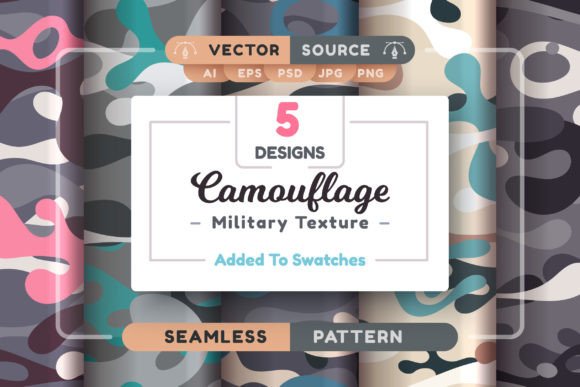
Camouflage Military Seamless Patterns: Practical, Scalable Design Resources for Real Projects
Camouflage military seamless patterns aren’t just about tactical aesthetics—they’re versatile, production-ready design assets built for flexibility and real-world application. Whether you're developing apparel prototypes, designing immersive game environments, crafting branded merchandise, or producing large-scale print installations, these patterns deliver consistent visual texture without visible seams, repetition breaks, or resolution compromises.
What Makes These Patterns Truly Seamless—and Why It Matters
“Seamless” here means more than just invisible tile edges. Each of the five patterns in this collection is mathematically balanced—colors, contrast, scale, and directional flow are calibrated so that tiles align naturally across any surface, no matter how large or irregularly shaped. That’s essential when wrapping a 3D product mockup, filling a billboard background, or tiling across multiple fabric panels for uniforms or outdoor gear. Unlike stretched or poorly tiled raster images—which pixelate, blur, or reveal awkward repeats—these patterns retain integrity at every scale.
Who Uses Camouflage Military Seamless Patterns—and How
Apparel & Fashion Designers rely on them for rapid prototyping. Need to visualize how a woodland camo flows across a jacket sleeve, then adapt it for cargo pants and a backpack? With AI and EPS vector files, you can recolor entire swatches in seconds, adjust density for lightweight nylon versus heavy-duty canvas, and export crisp outputs for digital textile printers—even at 600+ DPI. No reworking, no guesswork.
Game Developers & 3D Artists use them as PBR-ready base textures. The high-res JPG and PNG files (4167×4167 px) provide excellent detail for terrain decals, vehicle skins, or character armor overlays. Because they’re non-repeating in perceptual rhythm—not just technically tiled—they avoid the “wallpaper effect” that breaks immersion in open-world environments. Bonus: the PSD versions include layered smart objects, letting you quickly swap out tone maps or add weathering effects without flattening.
Marketing & Brand Teams apply them thoughtfully—not as clichés, but as grounded visual metaphors. A cybersecurity startup might use a subdued digital-gray camo pattern as a subtle background in pitch decks or trade show banners, evoking discretion, adaptability, and layered protection. A sustainable outdoor brand could reinterpret the same pattern in earthy ochres and moss greens to signal terrain awareness and low-impact presence—without leaning into militarism.
Architects & Interior Designers integrate them into material boards for acoustic wall panels, custom upholstery, or wayfinding signage. Vector scalability means you can test the same pattern at thumbnail size on a mobile app icon and at 12-foot height on a conference room accent wall—both with identical fidelity. No need to commission separate assets for each output.
Formats That Fit Your Workflow—Not the Other Way Around
You get what you actually need—not just what’s easy to generate. The ZIP archive includes:
- 5 AI files: Fully editable in Illustrator CC 2014+, with named layers, grouped elements, and native pattern swatches (.ai). Change stroke weights, shift hue ranges, or isolate individual foliage shapes—all while preserving tiling logic.
- 5 EPS files: Backward-compatible down to Illustrator 10. Ideal for legacy studio setups or print service providers who require EPS for RIP processing.
- 5 JPG + 10 PNG files: High-resolution (4167×4167 px), RGB-optimized, with transparent backgrounds where appropriate (PNG only). Perfect for web UI overlays, social media templates, or quick drag-and-drop into Figma or Sketch.
- 5 PSD files: Layered, non-destructive, and sized for precise masking—great for compositing over product photos or adding realistic fabric grain via blending modes.
- Graphic styles (.ai) and pattern swatches (.pat): Drop them directly into Illustrator or Photoshop to apply the camo instantly across shapes, text, or selections—no manual tiling required.
Real Considerations Before You Apply Them
While these Camouflage Military Seamless Patterns offer exceptional flexibility, thoughtful application matters. First, consider context: camouflage carries cultural weight. In civilian branding or public-facing design, subtle reinterpretation—like desaturating tones, abstracting shapes, or pairing with warm typography—helps avoid unintended associations. Second, think about contrast and legibility. If overlaying text or icons, test readability at intended sizes; some dense variants may require lightening or using the pattern as a subtle underlay rather than primary layer.
Also keep in mind that vector scalability has practical limits—not technical ones, but perceptual. Zooming a woodland pattern to fill a city-block mural works beautifully, but shrinking it to a 16×16 favicon loses all legibility. That’s where the included raster options shine: use the JPG or PNG versions for small-screen UI elements, and vectors for everything else.
Why “No Size Limit” Is More Than Marketing
The phrase “no size limit” reflects how these files behave—not theoretical ideals. Because the AI and EPS versions are true vector paths (not embedded rasters), enlarging them 10×, 100×, or even 1000× introduces zero aliasing, blurring, or interpolation artifacts. You’re not relying on AI upscaling tricks—you’re working with mathematically defined shapes, strokes, and fills. That’s critical for laser-cut stencils, CNC-machined panel textures, or embroidery digitizing workflows where precision defines quality.
And yes—AI-assisted tools *can* help push boundaries further (e.g., generating custom variants or adapting color palettes to match Pantone references), but these files give you full creative control from day one. No subscriptions. No watermarks. No dependency on cloud rendering.
When Practicality Meets Creative Confidence
These Camouflage Military Seamless Patterns don’t ask you to compromise between speed and quality—or between concept and execution. They meet you where your project lives: in Illustrator’s artboard, Photoshop’s layers panel, a Unity shader graph, or a textile mill’s platemaking software. They’re tested across industries not because they look cool, but because they solve problems—repetitive manual tiling, inconsistent scaling, format-switching fatigue, and last-minute resolution panic.
If you’ve ever spent hours adjusting tile offsets, resampling textures for different outputs, or explaining to a client why their “cool camo idea” doesn’t translate to a 20-foot banner—that’s exactly the friction this set was built to eliminate.