Gamer Geek Digital Papers Patterns
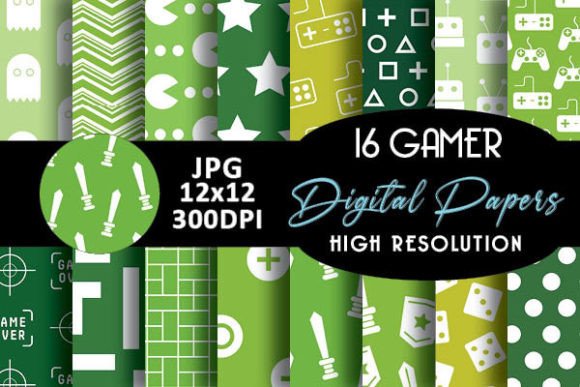
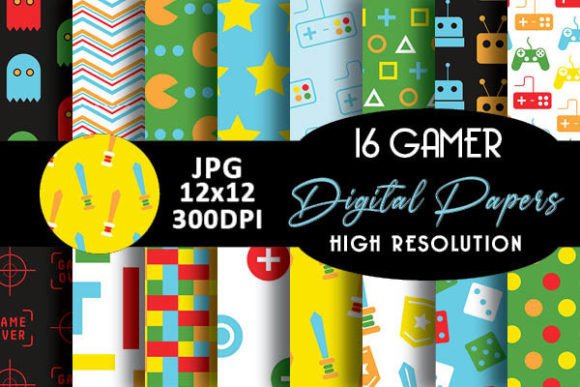
If you're crafting invitations, designing printable party kits, or building themed digital resources for gamers, Gamer Geek Digital Papers Patterns offer a quick, stylish, and versatile solution. These aren’t generic clipart sheets or bland textures — they’re 16 carefully designed digital paper backgrounds, each featuring playful, on-brand patterns like pixelated balls, retro controllers, game tokens, joysticks, and subtle grid motifs inspired by classic and modern gaming culture.
What Makes These Digital Papers Stand Out?
Each of the 16 Gamer Geek digital papers is delivered as a high-resolution PNG or JPG file (300 DPI), ready to use in both print and digital workflows. They’re seamless, meaning patterns repeat smoothly without visible edges — ideal for scaling across banners, cards, or full-page layouts. The color palettes balance nostalgic vibrancy (think neon greens and electric purples) with clean, modern neutrals — so they work whether you're designing for kids’ birthday parties or sleek e-learning modules for game design courses.
Unlike free pattern packs that often lack cohesion, these 16 papers share a unified visual language: consistent line weight, balanced negative space, and intentional spacing between repeated elements. That means when you mix and match — say, using a controller-patterned paper for an invitation background and a pixel-ball pattern for a gift tag border — everything feels intentionally connected.
Why Creators Love These Patterns
Whether you're a teacher planning a “Game Design 101” unit, a small business owner launching a tabletop gaming café, or a parent organizing a Minecraft-themed birthday, Gamer Geek Digital Papers Patterns save time without sacrificing personality. You don’t need design experience to get professional-looking results — just drag, drop, and layer in tools like Canva, Adobe Express, or even Microsoft Word.
For freelancers and bloggers, these papers add instant thematic polish to downloadable resources: think editable planners for streamers, printable quest logs for RPG groups, or branded social media templates. Educators use them to create visually engaging handouts — a multiplication worksheet with a subtle joystick pattern in the margin feels more inviting than plain white paper, especially for reluctant learners.
Real-World Uses You Can Start Today
- Birthday & Party Projects: Print them as scrapbook paper for photo collages, cut them into custom confetti, or use them as layered backgrounds in digital invites (e.g., pairing a ball-patterned paper with bold typography for a “Level Up!” birthday announcement).
- Crafting & DIY Gifts: Apply them to printable gift tags, decoupage them onto wooden game tokens, or incorporate them into vinyl-cut designs for mugs and tote bags.
- Digital Products: Bundle them into your own printable planner or journal kit for gamers — one paper for daily logs, another for challenge trackers, and a third for achievement badges.
- Small Business Branding: Use them as subtle website background textures, email newsletter dividers, or slide deck accents — all while keeping your brand identity fun, focused, and recognizably “gamer.”
No Design Degree Required — Just a Clear Goal
You don’t need Photoshop mastery to benefit from these patterns. Many users start by opening one file in Canva, uploading it as a background, and adding text or shapes on top. Others import them into Cricut Design Space to create layered cardstock cuts. Even beginners using Google Slides can set a Gamer Geek paper as a slide background and build presentations around it — no resizing headaches, no blurry repeats.
The real value lies in flexibility. One paper might serve three roles in a single project: as a background for a printable certificate, as a texture overlay on a button graphic, and as a border frame for a photo collage. That kind of reuse multiplies your creative ROI — especially if you're balancing side projects with a full-time job or family responsibilities.
Things to Keep in Mind Before You Begin
First, check your software’s compatibility. While these files work in most common programs, some older versions may not support transparent PNGs — in those cases, JPG versions are included for fallback use. Second, remember that digital papers are meant to be *backgrounds*, not standalone graphics. They shine when supporting other content — not competing with it. So avoid overloading a layout with multiple busy patterns at once; instead, choose one strong pattern per page or section.
Also consider your output method. If you plan to print, make sure your printer handles 300 DPI well — especially for smaller items like stickers or labels where detail matters. For digital-only use (like social posts or web graphics), the same files scale beautifully up to 8.5" x 11" or larger without losing crispness.
A Thoughtful Fit for Many Roles
Freelancers appreciate how quickly these papers help differentiate their offerings — a client hiring for a gaming convention flyer gets instant visual cohesion. Bloggers use them to refresh outdated resource libraries without rebuilding from scratch. Small business owners integrate them into seasonal promotions (“Summer Game Jam Sale” banners, anyone?) with minimal effort. And educators find them especially helpful for bridging engagement gaps — turning routine worksheets into something students actually want to pick up.
Even if you've never made a printable before, starting with Gamer Geek Digital Papers Patterns gives you a solid foundation. You’re not learning a new skill from zero — you’re leveraging thoughtful, pre-made assets that do the heavy lifting so your ideas take center stage.
Simple Next Steps
- Pick one paper that matches your current project’s mood — playful? Go for the pixel-ball pattern. Retro-futuristic? Try the grid-and-circuit motif.
- Open your preferred tool (Canva, PowerPoint, Affinity Designer — whatever feels familiar), upload the file, and set it as a background.
- Add your text, photos, or icons. Adjust opacity slightly if needed to keep readability high.
- Print or export — and notice how much faster and more confident the process feels.
These 16 Gamer Geek digital papers aren’t just decorative. They’re quiet collaborators — supporting creativity, saving time, and helping your message land with the right tone. Whether you're designing for fun, function, or profit, they bring consistency, charm, and a touch of geeky joy to every project you touch.