Fall Digital Paper, Autumn Patterns
Seasonal design assets often fall into two categories: mass-produced templates with generic foliage motifs or overly stylized illustrations that lack versatility. Fall Digital Paper, Autumn Patterns stands apart—not because it tries to be everything at once, but because it delivers three cohesive, hand-crafted digital papers built for real-world creative work. Developed by Collart Studio, these are not stock patterns repurposed from a library. Each is an original, hand-drawn and hand-painted artwork—scanned, color-corrected, and delivered as high-resolution 300 dpi files sized precisely at 12×12 inches.
What Makes These Papers Distinctive in Practice
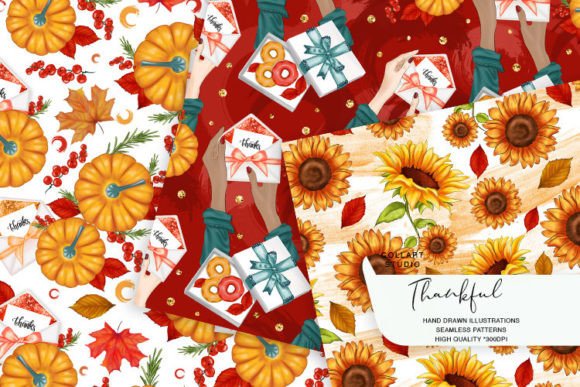
The distinction begins with origin: every leaf, acorn, branch, and texture was drawn and painted physically before digitization. That process results in subtle imperfections—slight pigment variation, soft watercolor bleed, gentle line weight shifts—that synthetic vector patterns rarely replicate. When used in print projects like invitations or planner stickers, those organic qualities translate into tactile authenticity. On screen—whether embedded in a blog header, a Canva social post, or a Shopify product banner—they retain warmth without appearing pixelated or oversaturated.
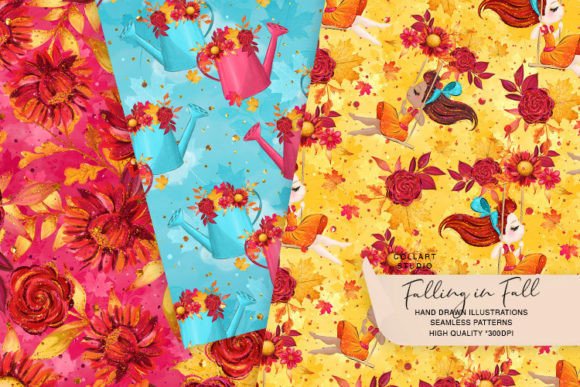
Each of the three papers offers a different compositional rhythm. One features clustered botanical elements arranged asymmetrically across the background; another uses a repeating motif of layered maple and oak leaves with intentional negative space; the third leans into texture—grainy paper underpainting overlaid with delicate ink-drawn vines and berries. None rely on gradients, drop shadows, or trendy filters. Instead, they prioritize balance, scale, and chromatic harmony within a restrained autumn palette: burnt sienna, olive green, ochre, charcoal gray, and muted cream.
Real-World Usability Across Creative Workflows
Usability isn’t theoretical—it’s tested in context. For planners and bullet journal enthusiasts, these papers convert cleanly into sticker sheets (using tools like Silhouette Studio or Cricut Design Space) without requiring extensive cleanup. The 300 dpi resolution ensures crisp edges when cut at small scales—no blurring on 0.75-inch tags or 1.25-inch calendar icons. For educators designing classroom resources, the neutral yet seasonal tone supports readability: text overlays remain legible without heavy contrast adjustments. Bloggers integrating them into WordPress headers or Pinterest pins find the 12×12 dimension flexible enough to crop vertically or tile horizontally without visible seams.
Print-on-demand creators report reliable performance across substrates. When applied to fabric via heat transfer vinyl, the hand-painted grain translates well to cotton tote bags and tea towels. In decoupage applications—say, on wooden boxes or ceramic mugs—the matte finish of the scanned originals avoids unnatural glossiness after sealing. Even in web design, where raster assets are sometimes avoided, these papers function effectively as CSS background images or layered hero section textures when optimized correctly (e.g., exported as WebP with moderate compression).
Strengths That Support Long-Term Use
Consistency matters—especially for professionals maintaining brand cohesion across seasonal campaigns. Unlike single-element clip art packs, Fall Digital Paper, Autumn Patterns provides unified visual language across all three files. The same ink line quality, analogous color base, and naturalistic proportioning mean mixing them within one project feels intentional, not haphazard. That cohesion extends to scalability: enlarging any pattern for a large-format poster yields no visible artifacting, while shrinking sections for micro-stickers preserves detail down to ~3 mm.
Reliability also comes from format simplicity. These are standard PNG files with transparent backgrounds—no layered PSDs requiring software-specific knowledge, no proprietary formats, no subscription dependencies. They integrate immediately into Adobe Creative Cloud apps, Affinity Suite, Procreate, or free alternatives like Photopea or GIMP. No fonts, scripts, or external assets are needed to use them.
Audience Fit: Who Benefits—and When
Fall Digital Paper, Autumn Patterns serves best those who need seasonal authenticity without sacrificing flexibility. Freelance graphic designers preparing client deliverables for cafes, boutiques, or wellness studios appreciate having ready-to-use, rights-cleared backgrounds that align with Q4 marketing timelines—without commissioning custom illustration. Small business owners launching limited-edition product lines (think pumpkin spice candles or handmade wool socks) use them for cohesive packaging inserts, email headers, and Instagram story templates—all from one consistent source.
Educators building themed lesson plans around harvest festivals or nature studies apply them to printable worksheets, classroom signage, or digital slide decks—avoiding copyright concerns associated with downloaded stock imagery. Bloggers covering lifestyle, slow living, or sustainable craft topics embed them in editorial graphics to reinforce seasonal narrative without overdesigning each post.
That said, it’s not ideal for every use case. If your workflow demands editable vector paths (e.g., for precise path manipulation in Illustrator), these raster files won’t meet that need. Similarly, users seeking ultra-bright, saturated “fall” palettes—think neon oranges or electric reds—will find the Collart Studio palette intentionally subdued. And while the hand-drawn aesthetic adds character, it may not suit highly technical, corporate, or minimalist branding systems that prioritize absolute uniformity.
Practical Integration Tips
Start by testing one paper at full size in your primary tool—import it into your planner template or blog layout editor and observe how text overlays behave. Adjust opacity slightly (85–95%) if layering behind typography improves legibility. For sticker cutting, isolate key motifs using selection tools before exporting individual SVGs—this preserves the integrity of the original hand-drawn lines better than auto-tracing.
When using for fabric or paper crafts, print a test swatch first on your intended material. Some matte-coated cardstocks absorb ink differently than glossy photo paper, affecting perceived saturation. Save edited versions with descriptive filenames (e.g., “fall-paper-olive-leaf-tile”) rather than generic labels—helpful when revisiting assets months later.
Zoom functionality on the product page isn’t just for aesthetics: clicking “Zoom” reveals fine details—how ink bleeds at leaf edges, how paint granulates in shadow areas—that inform whether a particular paper suits your output medium. A close look confirms whether texture density matches your decoupage adhesive’s drying time or your printer’s ink absorption rate.
Final Consideration: Value Beyond the Season
Digital papers like Fall Digital Paper, Autumn Patterns offer more than timely decoration. Their hand-made origin and deliberate restraint give them longevity. Used thoughtfully, they become part of a reusable seasonal toolkit—not discarded after November, but adapted: recolored subtly for winter projects, inverted for monochrome layouts, or cropped into standalone elements for year-round botanical themes. For creators managing multiple clients or personal brands across cycles, that adaptability reduces asset sprawl and strengthens visual continuity. It’s not about chasing trends. It’s about having trustworthy, expressive foundations—one season at a time.